 |
Peano
|
|
Peano
|
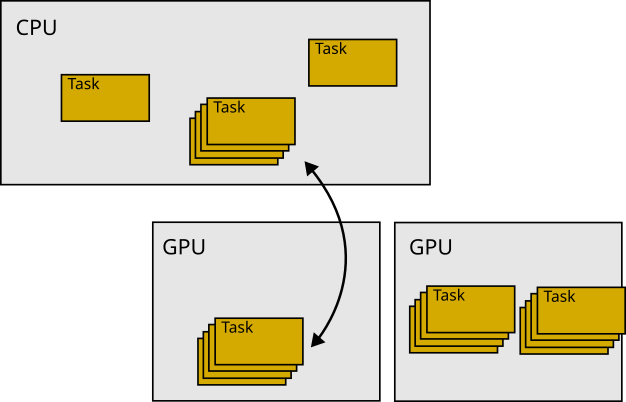
ExaHyPE uses GPUs in a classic offloading mode: It takes particular tasks, ships them to the GPU and then ships them back. This happens under the hood, and neither does data reside on the accelerator permanently nor is the accelerator used all the time. Not all solvers support GPU offloading, but those that can work with (enclave) tasks either have accelerator support built in or can be tweaked relatively easy to gain something from GPU devices.
If you have a solver with GPU support and want to activate this tasking, you have to do the following steps:
All instructions how to enable GPU support is collected in a GPU tutorial. This tutorial only demonstrates how you enable GPU support (which is relatively easy). For proper GPU engineering, you have to study the steps below which discuss how the GPU offloading works and how you can introduce it systematically, such that you gain performance (sometimes, just throwing stuff onto the accelerator without any further thought slows the code down).
ExaHyPE's GPU offloading approach assumes that there are computations (cell/patch updates) which can be done without any effect on global variables. It works if and only if we can ship a task to the GPU, and then get the solution data for this task back and no other global variabled changes. We furthermore assume that the computations that fit onto the GPU have no state. They can use some global, static variables, but they cannot access the solver's state which can change over time. We rely on code parts which have no side effects and do not depend on the solver state (minus global variables).
Working without side-effects might not work for all patches (Finite Volumes and Finite Differences) or octants (RKDG and ADER-DG) in your mesh: There are pieces of the mesh which evaluate and analyse some global data, or build up global data structures. In this case, ExaHyPE only offloads the remaining, simple patches/cotants to the GPU. That is, having a solver that supports patches/cells without side effects does not mean that all cells have to be side effect-free.
The second things to keep in mind is that ExaHyPE tries not to offload a single patch to the GPU. It can do, but this is then a degenerated variant of something way more generic: The code takes a set of octants from the mesh and moves them en bloc to the accelerator. There, one compute kernel updates all of these guys in one rush. We refer to this as fused updates. A description of the fusion approach is summarised in the description of the technical architecture.
The description above gives us a clear roadmap how to offload code in ExaHyPE to the accelerator:
We offload tasks to the accelerator. The particular tasking concept that we implement in ExaHyPE is called enclave tasking. You find the vanilla paper of this idea in
Alternatively, each lowering into Peano yields a README-xxxxx.md file. In this markup file, you also find all the information of papers that have an influence on your chosen solver configuration. Solvers that support enclave tasking typically have a distinct name. exahype2.solvers.fv.rusanov.GlobalAdaptiveTimeStepWithEnclaveTasking is for example a solver which yields tasks.
Once you have chosen such a solver and compile the code, there should be a tasks subdirectory after you've lowered your code to C++. It makes sense to look into this C++ code from time to time to check if the generated code does make sense.
Follow the instructions on Task fusion strategies to cross-validate that fusion in principle is enabled.
You next have to instruct your solver that you plan to have patch or cell updates without (write) access to the solver's internal state. They also don't alter the global state. Obviously, you can weaken these assumptions later on, but this then requires further manual work.
The Finite Volume enclave solvers for example all support stateless kernels, but the versions without enclave tasking do not support them. The solver documentation should clarify which one to select. For most of these GPU-enabled solvers, it is sufficient to pass an additional flag
into the constructor that tells the solver that we have PDE terms which have no side effect which also do not need the solver object. Consult the documentation of the respective solvers. Again, exahype2.solvers.fv.rusanov.GlobalAdaptiveTimeStepWithEnclaveTasking is a good prototype to study:
To faciliate the offloading, we have to create alternative versions of our PDE term functions that can work independent of the solver object (and in return cannot modify it). Depending on which terms we have, we'll need stateless versions of the flux, the non-conservative product and the source term. We'll always needs the eigenvalue function. Per function, keep the original one and add a second one which is
Offloadable. This is the last argument, i.e. a static version of a function has exactly the same arguments as the non-static, default variant but then has one more argument. The last argument is solely there to be able to distinguish the static version from the normal one, as C++ cannot overload w.r.t. static vs. not static. Offloadable is automatically defined in the abstract base class which 's Python API generates.Very often, the standard flux and eigenvalue routines can invoke the static variants and you can thus eliminate code redundancies. For example, you might have the normal flux function and a static flux function with the additional Offloadable parameter, but the normal function just invokes the static cousin.
In many of our codes, we take a function like
and simply split it into two variants:
The static version is used on the GPU. The normal one is used on the CPU yet defers immediately to the static version. Please note that GPUs are quite restrictive w.r.t. terminal outputs and assertions. You will have to remove both from your static routine versions. In the example above, the non-static version wraps the core functionality into assertions. Therefore, we have the assertions on the CPU, but the core part that goes to the GPU is free of assertions. The same holds for the logging.
In principle, the code is now GPU ready. Compile and run.
Most ExaHyPE solvers employ at least three different kernel variations: a normal one, one that vectorises aggressively on the host, and one that offloads to the GPU. If you use the default configuration, all should be set to some reasonable defaults. If this is not the case, you can manually alter
    self._fused_compute_kernel_call_cpu
    self._fused_compute_kernel_call_gpu
These values hold C++ strings, which are typically method invocations to the corresponding computing kernels. If you play around with these values, you might want to study further GPU realisation details and dive into the code.
Finally, we might want to tailor the fusion of tasks. For example, you might want to offload to the GPU if and only if there are enough tasks that you can bundle (fuse) into one meta task. Of you might want to use different GPUs depending on the task context. These decisions are made by the multithreading orchestration (among other things).
You can switch the orchestration manually in your C++ file. By default, the initialisation of ExaHyPE does this:
You can alter this one. A more elegant variant is likely that you use exahype2.Project.set_multicore_orchestration() to let the lowering into Peano automatically insert an appropriate setOrchestration() call. The namespace tarch::multicore::orchestration holds a bundle of different orchestration strategies that you can use to tweak your code. A good starting point is
If only some patches/cells can be offloaded to the GPU, then you can redefine the routine
in your solver. By default, this routine returns true. This default is written in the AbstractXXX solver. But nothing stops you from redefining the function in your particular solver subclass.
Very advanced codes write their own orchestration which ships particular tasks specifically to the GPU. Through this, you can tailor the task execution pattern towards your specific needs. Notably, the orchestration is asked per task type whether and where to ship the task.
This page discusses how ExaHyPE supports SIMT and SIMD compute kernels. ExaHyPE uses GPUs in a classic offloading, i.e. GPUs as accelerators. This means that it takes particular tasks, ships them to the GPU and then ships them back. This happens under the hood, and neither does data reside on the accelerator permanently nor is the accelerator used all the time.
The whole approach assumes that there are computations (cell/patch updates) which can be done without any effect on global variables. It works if and only if we can ship a task to the GPU, and then get the solution data for this task back and no other global variabled changes. We furthermore assume that the computations that fit onto the GPU have no state. They can use some global, static variables, but they cannot access the solver's state which can change over time. We rely on code parts which have no side effects and do not depend on the solver state (minus global variables).
The same argument holds for aggressive vectorisation: Vectorisation works best if the computations on a patch do not have any side effects. Basically, ExaHyPE assumes that GPU's SIMT and CPU's SIMD are two realisations of the same pattern.
Working without side-effects might not work for all patches: There are always patches which evaluate and analyse some global data, or build up global data structures. In this case, ExaHyPE only offloads the remaining, simple patches to the GPU. That is, having a solver that supports patches/cells without side effects does not mean that all cells have to be side effect-free.
Before you dive into this technical description of how GPU offloading (and very aggressive vectorisation) work, it makes sense to read through the tutorial on GPU offloading.
Configure ExaHyPE with the argument --with-gpu=xxx and select an appropriate GPU programming model. Rebuild the whole Peano core. This includes the ExaHyPE libraries.
The Finite Volume enclave solvers for example all support GPUs, but the versions without enclave tasking do not support them. The solver documentation should clarify which one to select. For most of these GPU-enabled solvers, it is sufficient to pass an additional flag
for the FV variants, e.g.) that tells the solver that we have PDE terms which have no side effect which also do not need the solver object. Consult the documentation of the respective solvers. Examples are
To faciliate the offloading, we have to create alternative versions of our PDE term functions that can work independent of the solver object (and in return cannot modify it). Depending on which terms we have, we'll need stateless versions of the flux, the non-conservative product and the source term. We'll always needs the eigenvalue function. Per function, keep the original one and add a second one which is
Offloadable. This is the last argument, i.e. a static version of a function has exactly the same arguments as the non-static, default variant but then has one more argument. The last argument is solely there to be able to distinguish the static version from the normal one, as C++ cannot overload w.r.t. static vs. not static. Offloadable is automatically defined in the abstract base class which 's Python API generates.Most ExaHyPE solvers allow you to insert the realisation of a routine directly from the Python code. In this case, the call ends up the AbstractMySolver class. Most classes call the corresponding routine set_implementation(). If you use this one, the code generator usually does not distinguish the two callback flavours and uses the same code snippet for the normal as well as the vectorised version. However, it is likely that the files end up in the cpp file of the abstract super class. That is, the compiler will not be able to inline anything. If your compiler struggles with the inlining, you might be forced either
ExaHyPE solvers which support GPUs/stateless operators typically host three different compute kernels. These kernels are plain C++ function calls, i.e. strings, on the Python level.
self._compute_kernel_call is a C++ function call for the normal task. This guy is called whenever you hit an octant, i.e. Finite Volume patch or a DG cell. It calls the virtual flux, eigenvalue, ... functions on the solver object.self._fused_compute_kernel_call_cpu is a C++ function call that ExaHyPE uses whenever it encounters a set of octants in the tree which can be processed embarrassingly parallel as they all invoke the same PDE and none of them alters the state of the underlying solver object. So the compute kernels identified by this string can call the static flux and eigenvalue instead of the virtual function.self._fused_compute_kernel_call_gpu is the equivalent to _fused_compute_kernel_call_cpu which the code uses when it decides to offload a bunch of cells to an accelerator.By default, these variants should point to reasonable variants once you switch on stateless operators and the variants are typically constructed in a way that they distinguish the various backends we support. That is, they yield a string of the form
which automatically picks a working default backend depending on your configuration.
While this gives you a working version quickly, you might want to switch to a tailored variant for your particular solver. This can be done by changing the actual solver kernel:
If only some patches/cells can be offloaded to the GPU, then you can redefine the routine
in your solver. By default, this routine returns true always. Here's the clue: This is a normal function, i.e. you can use the solver's state and make the result depend on this one.
patchCanUseStatelessPDETerms() yields, by default, true. So all compute kernels end up on the GPU if they are embedded into enclave tasks. You migth want to alter this, and keep some kernels on the host.
The sections below discuss what you should see in the code.
Once you have a GPU-ready solver, it makes sense to doublecheck quickly if the solver really dispatches the correct compute kernels. For this, we first study the generated task. Stateless routines are also very useful on the CPU, as we can aggressively vectorise over them. Therefore, the task should look similar to
The kernels might look completely different, but the principle is clear: Whenever we hit a cell, we check if patchCanUseStatelessPDETerms() holds. If this is not the case, we use the default version. However, if it holds, then we invoke the specialised version which assumes that there is a version with static (stateless) calls.
Scroll further down until you see the fuse() routine. This one is again very simple to digest:
We see here, that SYCL can run on both the host and the device, whereas we pick the OpenMP version if and only if we have picked a valid device.
If this call logic makes no sense, most solvers have attributes such as
    self._fused_compute_kernel_call_cpu
    self._fused_compute_kernel_call_gpu
to switch to the modified kernel realisation variant. Typically, there are factory mechanisms to alter those guys:
 1.9.8