 |
Peano
|
|
Peano
|
This section discusses some ExaParty-specific performance optimisation steps.
While ExaParty and its baseline, Peano, provide simplistic performance analysis features to spot some flaws, a proper performance optimisation has to be guided by external performance analysis tools. Furthermore, please read Peano's generic performance optimisation remarks parallel to this page. All of the recommendations there apply for ExaParty, too.
To enable proper vectorisation is not trivial within a Lagrangian framework, as we typically need the right instructions, i.e. compute kernels, but also a fitting memory layout. As a user, you are responsible to ensure that the memory layout is properly chosen, and then you can activate the solvers' vectorisation.
Some of ExaParty's solvers are however already well-prepared to exploit the knowledge about optimised memory layouts and proper setups of action sets and hence can be vectorised. This does not hold for all solvers. You have to study their documentation, typically alter some switches and then tune the memory layout and particle handling as described below. Please note that not all solvers are compatible with all graph compiler flavours either. Again, this is something you might want to check with the solver documentation.
Even if your solver does not support vectorisation, you might benefit from the discussions below such as the memory pool and the different flavours of active set handling. The impact just won't be that big. The page Creating new particle types (solvers) with new algorithmic steps provides further details how to write vectorised solvers, i.e. how to prepare solvers to be able to exploit continuous, well-administered memory.
There are two different versions how to maintain the active sets: We can either build them up as proper sets and add particles to the set whenever we touchCellFirstTime() and remove them from the cell when we invoke touchCellLastTime(). Or we can work with a list, memorise how many particles we add per touchCellFirstTime() and remove exactly this number when we backtrack through the tree.
The set variant is robust, but it is not very fast as we have to check for each particle in touchCellLastTime() where it is within the set and then we can remove it. We also miss out on any adjacent memory storage. The list variant is faster and preserves the ordering of the particles per vertex/cell (see the remarks below), but it works if and only if the particle-mesh association remains invariant. Such an "ordered" particle sequence allows you to use compute kernels with coalesced memory access, i.e. vectorisation. This insight gives rise to a third variant, where we use the coalesced memory storage and insert sorting sweeps whenever the particle positions change, such that we can always work with properly sorted particles.
Whether or not to use one variant or the other is a decision that's made by the graph compiler. Some compiler flavours support different active set construction variants, others are tied to one variant only. By default, the project initialises its graph compiler with the variant that does not try to vectorise or use sorted particles. You can alter that in your code:
Just pick another variant (consult namespace docu) here. Please note that these operations do typically unfold their potential if and only if you use a fully vectorised solver in combination with a proper particle memory management below.
Note: If you use a scheme which relies on vectorisation all the time, you have to also alter the initialisation via
Maintaining the association of particles to meshes is key, as Peano traverses the mesh and issues the particle updates for those particles tied to particular vertices or cells. We distinguish different ways how the particles themselves are organised in the memory and how the indices over the particles are built up and maintained. All particles are always stored on the heap, but how they populate the heap can be changed by using different memor pools.
You can alter the scheme per particle species by taking your instance of peano4.toolbox.particles.ParticleSet. Each particle set hosts an attribute generator. You can exchange the generator and thus switch administration and storage variants per species.
| Feature | Generator | Semantics |
|---|---|---|
| scattered particles, list index | peano4.toolbox.particles.ParticleSet.ParticleSetGenerator_ScatteredOnHeap_IndexByList | Scatter the particles all over the heap. The pointers per vertex to the particles are organised as a linked list. |
| scattered particles, vector index | peano4.toolbox.particles.ParticleSet.ParticleSetGenerator_ScatteredOnHeap_IndexByVector | Almost the same as peano4.toolbox.particles.ParticleSetGenerator_ScatteredOnHeap_IndexByList, but the lists of pointers are realised through std::vector. |
| arrays of particles per vertex | peano4.toolbox.particles.ParticleSet.ParticleSetGenerator_ContinuousPerVertex | The code tries to hold the particles associated with one vertex in one consecutive array. Whenever this is not possible, we use a linked list to reference the particles scattered over the memory. |
| global array of particles | peano4.toolbox.particles.ParticleSet.ParticleSetGenerator_GlobalContinuous | The code tries to hold the particles in one big consecutive array where all particles associated with one vertex are held en bloc. |
The scattered variants holds the particles somewhere on the global heap, and try never to move them. If particles travel within their subdomain, the code solely update the pointers each vertex holds to the particle. As a consequence, we might run into a fragmented heap occupation and the compute kernels will have to deal with scattered memory access. Coalescent memory access is basically never possible.
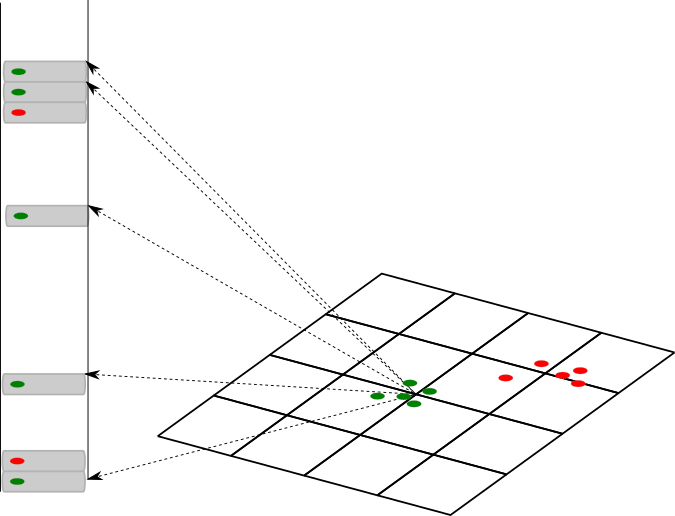
In return, we don't move (potentially heavy) particles around in memory and hence don't stress the OS memory system. To maintain the lists of the particles per vertex, we offer different versions. Again, the pointers can be stored within a consecutive memory block (array), or we can use a list which adds another level of overhead but is more flexible if particle-associations change frequently.
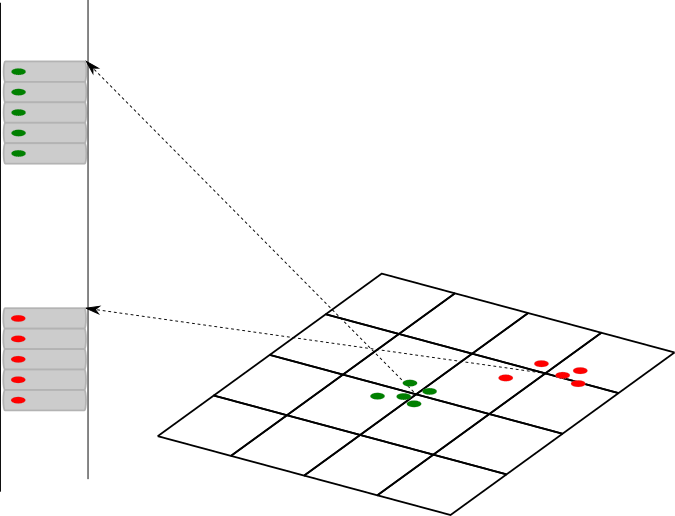
We also offer a variant which stores the particles continuously within one memory chunks per vertex. You can study toolbox::particles::memorypool::VertexWiseContinuousMemoryPool for a discussion on its realisation. Finally, there's also a variant which tries to hold all the particles in one big blob, i.e. as one large array. This global sorting is realised through toolbox::particles::memorypool::GlobalContinuousMemoryPool.
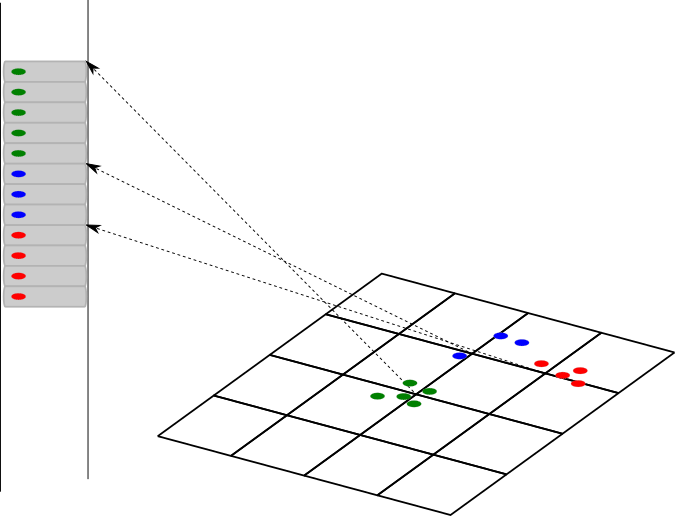
The code to switch the storage scheme is relatively easy. Capture the particle set that the ExaParty project returns when you add a particle species:
The line above changes the particle set generator, i.e. the class which maps the particle set onto an implementation.
Once we have optimised the data layout, we can use this to start tweaking the actual compute kernels. We can, for example, vectorise them aggresively or offload (some of) them to a GPU. These techniques are studied in the last sections of Creating new particle types (solvers) with new algorithmic steps.
Besides the description of "how to tune" a kernel, we strongly advise to consult ExaParty's page on runtime analysis, too.
 1.9.8