 |
Peano
|
|
Peano
|
Singleton logger for the Peano 4 Python API. More...
Public Member Functions | |
| __new__ (cls) | |
| LoggerVerbosity | verbosity (self) |
| verbosity (self, LoggerVerbosity value) | |
| bool | is_visualisation (self) |
| True if and only if verbosity is set to LoggerVerbosity.VISUALISATION. | |
| bool | is_text (self) |
| True if verbosity is set to LoggerVerbosity.TEXT or LoggerVerbosity.VISUALISATION - visualising always dumps text alongside the visualisation, it is never the only output, so this is also true whenever is_visualisation is (. | |
| str | file_name (self) |
| file_name (self, str value) | |
| log (self, str message, LoggerPrintOption print_option=LoggerPrintOption.IF_VERBOSE) | |
| By default, only printed to the console if verbosity is not OFF. | |
| warn_and_confirm (self, str message) | |
| Log a warning and let the user decide whether to continue. | |
| new_section (self, str section_name) | |
| close (self) | |
| Called automatically when the program terminates (see atexit registration in new). | |
Static Public Attributes | |
| str | AcceptWarningsEnvironmentVariable = "PEANO_ACCEPT_WARNINGS" |
Protected Member Functions | |
| _show_visualisation_window (self) | |
| Open a window displaying the Peano logo. | |
Protected Attributes | |
| _visualisation_window_shown | |
| _verbosity | |
| _file_name | |
Static Protected Attributes | |
| _instance = None | |
Singleton logger for the Peano 4 Python API.
Python has no dedicated singleton keyword or construct. The idiomatic way to get the same effect is to override new, so repeated calls to Logger() all return the one and only instance instead of creating a new object every time.
The logger holds an in-memory output stream (self._stream), which is protected and never accessed from the outside. Use log()/new_section() to accumulate details into it over the course of the run; nothing is written to disk until the stream is flushed into file_name.
Once the singleton is created, it registers itself with atexit, so close() is invoked automatically when the program terminates - you do not have to call it yourself.
| peano4.api.Logger.Logger.__new__ | ( | cls | ) |
Definition at line 60 of file Logger.py.
References peano4.api.Logger.Logger.__new__(), and peano4.api.Logger.Logger._instance.
Referenced by peano4.api.Logger.Logger.__new__().
|
protected |
Open a window displaying the Peano logo.
Called once, the first time verbosity is ever set to LoggerVerbosity.VISUALISATION. If no display is available (e.g. a headless run), matplotlib prints a warning and this silently is a no-op rather than failing the run.
The window is opened non-blocking, so the run continues straight away. It is not closed automatically though: we register a blocking plt.show() to run at program exit, so the window stays on screen - the user has to close it manually - rather than vanishing the moment the process would otherwise terminate.
Definition at line 81 of file Logger.py.
Referenced by peano4.api.Logger.Logger.verbosity().

| peano4.api.Logger.Logger.close | ( | self | ) |
Called automatically when the program terminates (see atexit registration in new).
Flushes the accumulated stream into file_name, preceded by a section stating when the file was closed.
If file_name already exists, we do not overwrite it. Instead, we attach a timestamp to the file name, i.e. log.md becomes something similar to log-20240101-120000.md.
This routine always prints a report to the console about the newly generated logging file.
Definition at line 207 of file Logger.py.
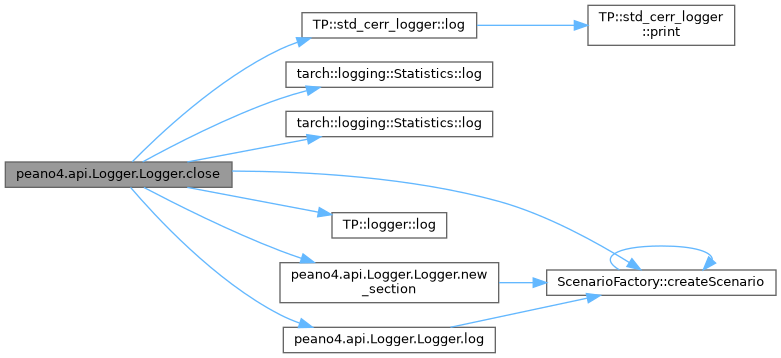
References postprocessing.PerformanceData.PerformanceData._file_name, peano4.api.Logger.Logger._file_name, tarch.plotter.api.output.Visualiser.Visualiser._file_name, tarch.plotter.api.output.VTUUnstructuredGrid.VTUUnstructuredGrid._file_name, OutputFile.OutputFile._file_name, ScenarioFactory.createScenario(), tarch::logging::Statistics.log(), tarch::logging::Statistics.log(), TP::std_cerr_logger.log(), TP::logger.log(), TP::LoggingAdapter.log, peano4.api.Logger.Logger.log(), and peano4.api.Logger.Logger.new_section().
| str peano4.api.Logger.Logger.file_name | ( | self | ) |
Definition at line 137 of file Logger.py.
References postprocessing.PerformanceData.PerformanceData._file_name, peano4.api.Logger.Logger._file_name, tarch.plotter.api.output.Visualiser.Visualiser._file_name, tarch.plotter.api.output.VTUUnstructuredGrid.VTUUnstructuredGrid._file_name, and OutputFile.OutputFile._file_name.
| bool peano4.api.Logger.Logger.is_text | ( | self | ) |
True if verbosity is set to LoggerVerbosity.TEXT or LoggerVerbosity.VISUALISATION - visualising always dumps text alongside the visualisation, it is never the only output, so this is also true whenever is_visualisation is (.
Definition at line 123 of file Logger.py.
References peano4.api.Logger.Logger._verbosity.
| bool peano4.api.Logger.Logger.is_visualisation | ( | self | ) |
True if and only if verbosity is set to LoggerVerbosity.VISUALISATION.
Implies is_text, since visualising always dumps text alongside the visualisation (
Definition at line 111 of file Logger.py.
References peano4.api.Logger.Logger._verbosity.
| peano4.api.Logger.Logger.log | ( | self, | |
| str | message, | ||
| LoggerPrintOption | print_option = LoggerPrintOption.IF_VERBOSE |
||
| ) |
By default, only printed to the console if verbosity is not OFF.
Definition at line 144 of file Logger.py.
References peano4.api.Logger.Logger._verbosity, and ScenarioFactory.createScenario().
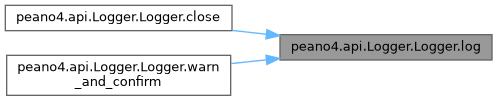
Referenced by peano4.api.Logger.Logger.close(), and peano4.api.Logger.Logger.warn_and_confirm().

| peano4.api.Logger.Logger.new_section | ( | self, | |
| str | section_name | ||
| ) |
Definition at line 200 of file Logger.py.
References peano4.api.Logger.Logger._verbosity, and ScenarioFactory.createScenario().
Referenced by peano4.api.Logger.Logger.close().


| LoggerVerbosity peano4.api.Logger.Logger.verbosity | ( | self | ) |
Definition at line 71 of file Logger.py.
References peano4.api.Logger.Logger._verbosity.
| peano4.api.Logger.Logger.verbosity | ( | self, | |
| LoggerVerbosity | value | ||
| ) |
Definition at line 75 of file Logger.py.
References peano4.api.Logger.Logger._show_visualisation_window(), and peano4.api.Logger.Logger._visualisation_window_shown.

| peano4.api.Logger.Logger.warn_and_confirm | ( | self, | |
| str | message | ||
| ) |
Log a warning and let the user decide whether to continue.
The warning is always printed and written into the log. Afterwards, the user has to accept the warning or abort. If the user aborts, the routine raises an exception, i.e. the Python script terminates.
If the environment variable PEANO_ACCEPT_WARNINGS is set to 1, all warnings are accepted without asking. Use this for batch jobs. If the variable is not set and there is no terminal to ask the user (stdin is not a terminal), the routine aborts.
| message | str The warning. It should explain what goes wrong if the user accepts it. |
Definition at line 158 of file Logger.py.
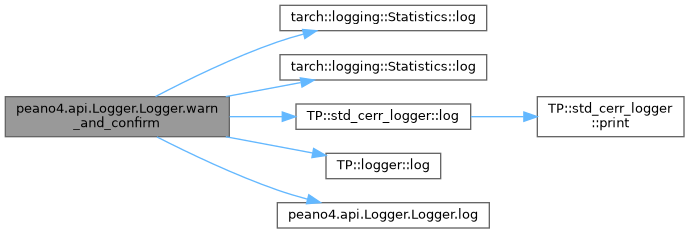
References TP::LoggingAdapter.log, tarch::logging::Statistics.log(), tarch::logging::Statistics.log(), TP::std_cerr_logger.log(), TP::logger.log(), and peano4.api.Logger.Logger.log().
|
protected |
Definition at line 142 of file Logger.py.
Referenced by peano4.api.Logger.Logger.close(), tarch.plotter.api.output.Visualiser.Visualiser.display_single_file(), peano4.api.Logger.Logger.file_name(), OutputFile.OutputFile.parse(), postprocessing.PerformanceData.PerformanceData.parse(), tarch.plotter.api.output.Visualiser.Visualiser.read_metadata(), and tarch.plotter.api.output.VTUUnstructuredGrid.VTUUnstructuredGrid.write_vtu().
|
staticprotected |
Definition at line 58 of file Logger.py.
Referenced by peano4.api.Logger.Logger.__new__().
|
protected |
Definition at line 79 of file Logger.py.
Referenced by peano4.api.Logger.Logger.is_text(), peano4.api.Logger.Logger.is_visualisation(), peano4.api.Logger.Logger.log(), peano4.api.Logger.Logger.new_section(), and peano4.api.Logger.Logger.verbosity().
|
protected |
Definition at line 78 of file Logger.py.
Referenced by peano4.api.Logger.Logger.verbosity().
|
static |
 1.9.8