 |
Peano
|
|
Peano
|
The ExaParty extension consist of two ingredients: a Python-API and a set of C++ tools.
The C++ tools use Peano's tarch and the particles toolbox. Overall, the ExaParty extension follows the blueprint of Peano's application architecture.
At the highest point of the code, i.e. the thing that users see, there is a project which hosts particles. Each particle is an instantiation of a particular numerical schemes. Each numerical scheme defines a sequence of steps for the particle. Maybe the simples example for such a sequence of steps can be found in exaparty.api.particle.ExplicitEulerFixedInteraction Radius. As summarise: the user models the simulation as a project (which hosts information such as "which timespan do I want to simulate") which hosts one or multiple particles, where each particle defines a strict sequence of steps.
Users can now inject their actual physics (interaction forces, e.g.) by injecting source code into the particle. Injecting means typically that users say "use this code snippet to compute the force between two particles".
Once this first step is complete, users invoke exaparty.api.Project. This is where a lot of magic happens: A so-called graph compiler runs through the project with its particles and puzzles out
With this information, the project creates a straight Peano project which hosts the computational steps, all data and the action sets and observers.
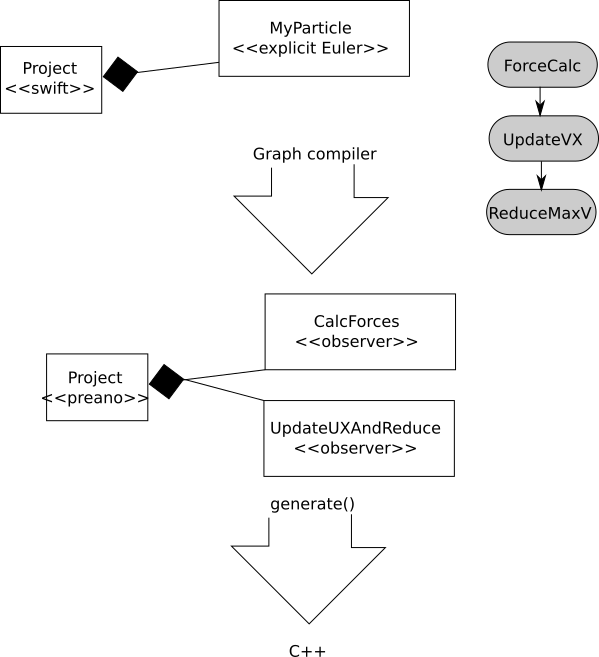
The cartoon above tries to illustrate the core principle behind our code: The user here has created a project with one particle which implements an explicit Euler. Explicit Euler here means that the particle runs through three logical steps.
The graph compiler takes this specification and finds out that we have to employ two mesh traversals to realise this scheme. It therefore builds up a Peano project, where the mesh can handle the particles and which has two observers. Each observer has all the action sets which are required to administer the particles (such as sorting them), but that also hold the C++ code snippets that the user originally has added to the explicit Euler. So these code snippets are piped through and now inserted at the right point throughout the mesh traversal. After the graph generator has terminated, the Peano project also is provided with a main function which runs through the (two) steps over and over again - in the right order each invoking the right observer - until the terminal time is reached.
This Peano project finally is used to generate the actual C+ code which does not contain any Python anymore.
Particles are held within the mesh in their closest persistent aka non-hanging vertex. They can also be distributed among the different levels. We call this storage scheme also dual tree storage. That is, the compute kernels can always assume that particles are held in a consistent way, i.e. at the right mesh level at the right vertex. The details can be found in peano4.toolbox.particles.AbstractUpdateParticleGridAssociation.
If a computational step in a computational scheme alters the particle positions or their interaction radius, it is the graph compiler's job to ensure that a resorting is triggered in the next grid sweep. Along the same lines, any resorting should again trigger an adaptive remeshing, as the mesh structure typically follows the particle distribution. The latter is realised by adding the action set peano4.toolbox.particles.ParticleAMR to the relevant computational steps.
All particle modifications are realised through mesh traversals. That is, an observer runs through the mesh. Whenever it observes a relevant action (such as "hey, I've touched this vertex with its particles for the first time"), the observer runs through all the action sets that are associated with it and calls the respective functions. In the case above, this would be touchVertexFirstTime().
It is important to note that Peano's mesh traversals result from top-down tree traversals always. This allows us to realise particle-particle interactions via simple definitions of so-called active and local particle sets. Details on this can be found in peano4.toolbox.particles.UpdateParticle_MultiLevelInteraction_Sets for example.
CELL_SIZE is as small as possible everywhere, but still larger than twice the search radius. Particles can only access particles within the cell they themselves are located and a neighbour cell. So the particle's search radius guides the AMR.In other words:
As long as the search radius is bigger than the interaction radius, the AMR will ensure that all particles within the interaction radius reside within a neighbouring cell.
If you decide to make the interaction radius bigger throughout the simulation, you have to check if the search radius still remains bigger. If not, particles within the interaction radius might be two cells away and you might miss them. So once you make the interaction radius bigger than the search radius, you have to reset the search radius and tell Peano to remesh and resort.
So the CELL_SIZE is chosen by Peano to accommodate the search radius H. The H is the area where particles can search for neighbours. Therefore, any particle-particle distance r <= H is fine. If the r grows over time, you have to increase H. In this case, you however have to tell Peano to resort. Peano then might decide to trigger AMR and effectively change CELL_SIZE. So CELL_SIZE >= 2H >= 2r
 1.9.8