 |
Peano
|
|
Peano
|
The task graph abstraction allows users to formalise their solver steps over small task graphs which are then lowered into a sequence of Peano mesh traversals. More...
Namespaces | |
| namespace | compiler |
| Compilers are simple functions. | |
| namespace | Graph |
| namespace | Runner |
| namespace | Task |
The task graph abstraction allows users to formalise their solver steps over small task graphs which are then lowered into a sequence of Peano mesh traversals.
An ExaHyPE solver's generator, i.e. the part that translates the pyysical model into a numerical workflow, describes each algorithmic phase (setup, time stepping, plotting) as a peano4.api.taskgraph.Graph of peano4.api.taskgraph.Task instances. Each task defines computations over a mesh entity (vertex, face, cell, or global), subject to dependencies between the tasks. A simple task graph reads as follows:
The solvers use this formalism to set up graphs similar to this one:
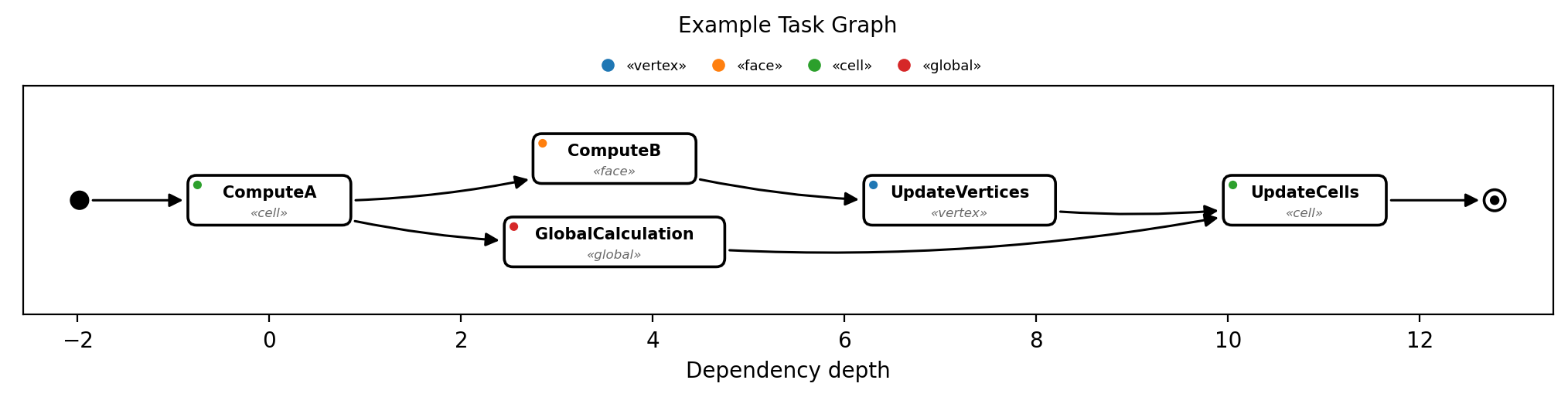
This is obviously strongly simplified. A proper yet still simplistic example can be found in exahype2.api.fv.SetupSimulationOverRegularGrid. The core interesting stuff looks similar to
The typical steps are always the same:
Note the nice feature at the end of the script: The API comes along with a routine to visualise the arising task graph. This is the same feature used for the example image above.
The idea behind the task graph feature of Peano is that there are different compilers which take the task graph and lower it onto grid traversals. The term "lower" is taken from the xDSL compiler project and highlights that we go from more abstract definitions close to the actual implementation.
There are different compilers available, each producing a different type of a task graph implementation. You find them all in peano4.api.taskgraph.compiler. The simples one if @ref peano4.api.taskgraph.compiler.Sequential, which maps the task graph onto a total order preservering the dependencies. Each task of the rearranged total order (each step) is then mapped onto one mesh traversal. This is the simplest way to execute a task graph, through obviously might not be the most efficient one.
Besides the lowering onto Peano mesh traversals, the compilers also yield brief functions which we can call from the main() function later to step through all the mesh traversals which make up one task graph realisation.
Each task can depend on an arbitrary number of predecessor tasks. There is no feature to model outgoing dependencies. They are implicitly given by other tasks referencing predecessors.
The task graph does not have to have a unique root task. It can comprise multiple ready tasks and can have multiple terminal tasks.
Each task can hold an arbitrary number of Peano 4 action sets (peano4.api.solversteps.ActionSet). Each action set can plug into all kinds of events. This seems to be a contradiction: The task is tied to a particular mesh entity, while the action set can define actions for multiple mesh entities. The task association defines dependencies, the action set what is done. If task A depends on B and B is tied to vertices, any operation over a cell in A will be executed after all operations over the cell's adjacent vertices in B have completed. The action sets of A still might also do something on cells and faces as well, but this is not subject to the dependency handling.
By default, tasks in the task graph do not repeat. This means that they are executed once. But users can attach a boolean expression to a task which is evaluated at the end of the task's execution. If it evaluates to true, then the task is repeated. This is useful for tasks that need to be executed multiple times until a certain condition is met. Unfortunately, a task that can repeat can never be merged with any successor, so these repeating tasks kind of veto any optimisation.
Each task can carry arbitrarily many tags. They are plain strings, stored in the set tags of peano4.api.taskgraph.Task.Task, so one task can be tagged by several independent parties at the same time. Tags are global: Nobody constructs a tag object.
Tags allow you to pick out tasks from a graph which someone else has built: If you know that there is a task tagged with MYTAG, then peano4.api.taskgraph.Graph.find_tasks() returns all tasks which carry this tag, and you can add new tasks behind them through peano4.api.taskgraph.Graph.insert_after().
The tags carry no intrinsic semantics from the task graph's point of view, i.e. the task graph compilers ignore them. It is up to the user to define their meaning.
 1.9.8